Libby is making changes to help you choose how you want to see or filter AI content.
These AI Content Controls are coming to Libby in the next few weeks; this is what they will look like.
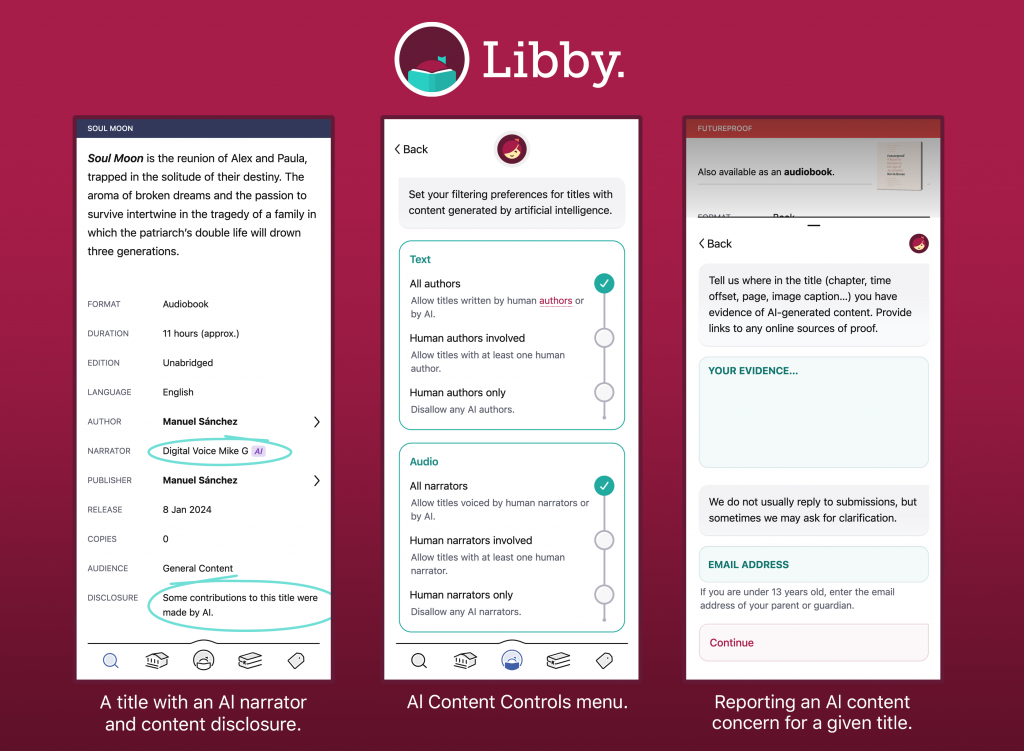
AI disclosures in Libby will be on title details screens
- An AI disclosure that reflects publisher-provided information. There are three possible statuses: yes, there are AI contributions; no AI contributions; or no information has been provided yet.
- An "AI" badge next to contributors (e.g., narrators) that are disclosed as AI.
- A way to report a content concern for titles that have an unknown AI status. OverDrive will review reported AI concerns and work with publishers to update title metadata as necessary.
AI Content Controls in Libby
In Libby, users can set their preferences for discovering titles with AI contributions via a new Content Controls menu.
This menu will present AI contribution choices in four different categories: text, audio, graphics, and translation. Each category has several options, so that people can find the right balance for them.
AI Content Controls apply to all titles in Libby, whether you’re browsing or searching. For example, if a user disallows AI audio in Libby, all AI narrators will be filtered out of search results and library lists.
How they’re rolling this out
OverDrive is working to ensure that AI disclosure metadata is correct across the catalog, to the best knowledge of our publisher partners. At first there may be incomplete coverage, but it will improve over time. New metadata from publishers will be processed and reflected in our products as soon as it becomes available. Once users have their preferences set up in Libby, new or updated titles matching their AI contribution criteria will be filtered out.